
Conversation Topics | 2026-05-25
How to Stay Safe When Using Random Video Chat Websites
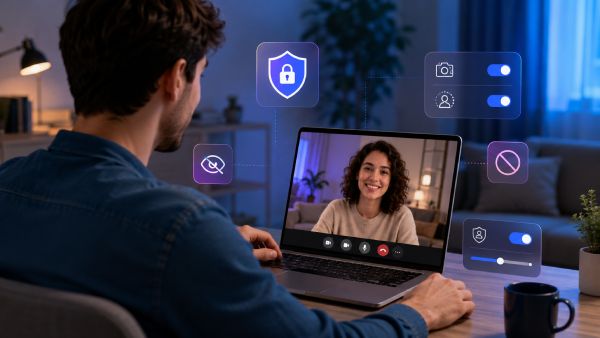
Random video chat sites can be safe, but only when you protect your privacy and choose a platform with clear safety tools. Since these sites connect you with strangers, your username, camera background, and personal boundaries matter from the first call.
The main risks include sharing personal information too soon, showing identifiable details on camera, clicking unsafe links, or staying in a chat that feels uncomfortable. These risks are not only theoretical. In 2024, the FTC reported more than $12.5 billion in consumer fraud losses, while the FBI's IC3 recorded 859,532 internet crime complaints and over $16 billion in reported losses. These figures are not specific to video chat, but they explain why users should treat links, money requests, and personal questions carefully when talking to strangers online.
This guide explains how to stay safe when using random video chat websites, what warning signs to watch for, and how to choose a platform that gives you more control while meeting new people online.
How to Prepare Before Starting a Random Video Chat
Staying safe starts before the first call begins. These platforms connect you with people you do not know, so a few preparation steps can help protect your privacy and make the experience feel more controlled.
Choose a Platform With Clear Safety Rules
Choose a video chat platform that explains its safety rules clearly. A trustworthy site should show what behavior is not allowed, how reports are handled, and what tools users can use when a chat becomes uncomfortable.
Avoid sites that feel unmoderated or make it hard to find safety information. If a platform does not show clear rules, users may have less control when problems happen.
Check Privacy Settings Before You Start
Before starting a video chat, review the privacy settings. Check whether the site allows you to control who can contact you, whether location details are visible, and how your profile information appears to others.
These settings may seem small, but they can reduce unwanted attention and help you decide how much information you want to share.
Use a Safe Username and Limited Profile Details
Do not use your full name, phone number, school name, workplace, or social media handle as your username. A simple nickname is safer when talking to strangers online.
Keep your profile short and general. You can share interests like music, movies, or travel, but avoid details that make it easy for someone to identify you.
Review Your Camera Background
Before turning on your camera, check what appears behind you. Photos, mail, street views, school logos, work badges, or personal items can reveal more than you expect.
A plain background is usually safer. It helps you stay focused on the conversation without exposing private details.
Avoid Revealing Your Location During the Call
Avoid starting a video chat from a place that clearly shows where you live, study, or work. Bedrooms, front doors, apartment windows, school buildings, and office spaces can reveal more than you expect.
Choose a neutral setting when possible. The goal is not to hide everything, but to avoid giving strangers details they do not need.
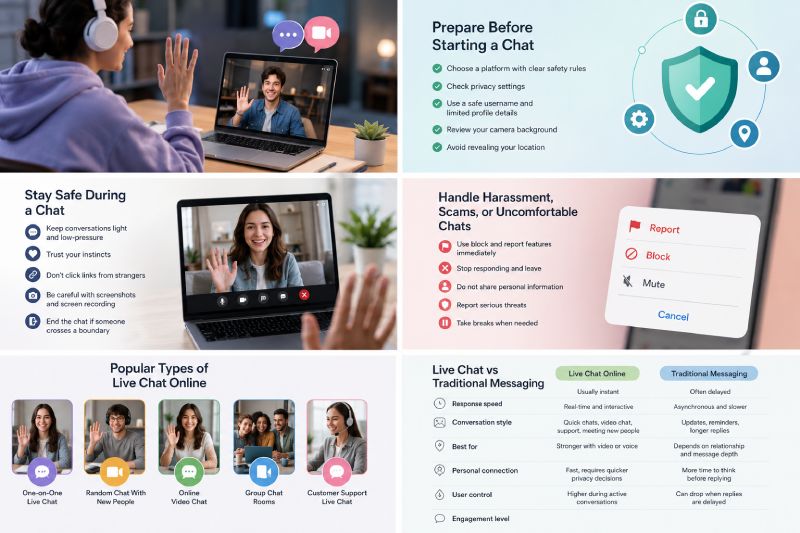
How to Stay Safe During a Random Video Chat
Once a random video chat begins, safety depends on how you manage the conversation in real time. Since you are talking to someone you do not know, it is better to stay alert, keep control, and leave quickly if something feels wrong.
Keep the First Conversation Light and Low-Pressure
Start with simple topics like hobbies, music, movies, travel, or daily life. Avoid sharing personal details too early, even if the other person seems friendly.
A light conversation helps you see whether the chat feels comfortable. It also gives you time to decide whether you want to continue.
Trust Your Instincts When a Chat Feels Off
If someone asks strange questions, pushes for private information, or makes you feel uncomfortable, trust that feeling. You do not need to explain yourself or keep the chat going.
A random video chat should feel casual, not stressful or pressured. If the other person makes you uncomfortable, leave the chat instead of trying to explain yourself.
Do Not Click Links From Strangers
Avoid clicking links sent by people you just met. Some links may lead to scams, fake login pages, malware, or unsafe websites.
This is especially important because phishing and spoofing were among the top cybercrime complaint categories reported to the FBI in 2024. If someone keeps pushing you to open a link, scan a code, or move to another platform, treat it as a warning sign. Ending the chat is safer than taking the risk.
Be Careful With Screenshots and Screen Recording
Remember that anything shown on camera could be captured by the other person. This includes your face, background, username, messages, or anything visible on your screen.
Do not show private documents, personal photos, account pages, or location details during a random video chat. Keep the camera view simple and avoid sharing anything you would not want saved.
End the Chat If Someone Crosses a Boundary
You can end a chat at any time. If someone becomes rude, sexual, aggressive, threatening, or too pushy, leave the conversation immediately.
You do not need to stay polite when your privacy or comfort is at risk. Use the block or report tools if the website provides them, especially when the behavior feels serious.
How to Handle Harassment, Scams, or Uncomfortable Chats
Even with good preparation, not every random video chat will feel safe. If someone becomes aggressive, asks for money, pressures you for private details, or makes the conversation uncomfortable, act quickly and protect yourself first.
Use Block and Report Features Immediately
Use the block or report feature as soon as a chat feels unsafe. Do not wait to see whether the situation gets better.
Blocking stops the person from continuing the conversation. Reporting helps the platform review harmful behavior and take action when needed.
Save Evidence When Serious Safety Issues Happen
If the situation involves threats, fraud, blackmail, harassment, or sexual pressure, keep a record if it is safe to do so. This may include the username, profile details, messages, screenshots, or time stamps.
Only save what is necessary. The goal is to keep a clear record in case you need to report the issue to the platform or another authority.
Do Not Continue a Chat Out of Politeness
You do not owe a stranger more time just because the conversation already started. If someone ignores your boundaries, asks uncomfortable questions, or pressures you to stay, end the chat.
Being polite should never matter more than feeling safe. A quick exit is often the best response.
Report Fraud or Threats Through the Right Channels
If someone asks for money, sends suspicious links, threatens you, or tries to blackmail you, report it through the platform first. Use the site's safety tools and follow any reporting instructions they provide.
For serious threats, fraud, or illegal behavior, consider reporting the issue to local authorities or the proper online safety organization in your country.
Talk to Someone You Trust If the Experience Feels Serious
Some uncomfortable chats are easy to leave behind. Others can feel upsetting, stressful, or personal, especially if someone threatened you or pressured you.
If the experience feels serious, talk to a trusted friend, family member, teacher, or support person. You do not have to handle the situation alone.

How to Choose a Safer Random Video Chat Website
Choosing the right random video chat website matters before the first call starts. A safer platform should give users clear rules, privacy options, and simple tools for leaving or reporting unwanted interactions.
Platform safety also matters at scale. NCMEC's CyberTipline received 20.5 million reports of suspected child sexual exploitation in 2024, and online enticement reports reached more than 546,000, up 192% from 2023. These figures are not specific to random video chat sites, but they explain why moderation, reporting tools, and age rules should be part of the selection process.
Before using a random video chat site, check whether it offers:
- Clear community guidelines
- Easy-to-find block and report tools
- Privacy settings
- Age rules or verification options
- Moderation support
- Matching or contact filters
- A privacy policy that explains how user data is handled
Look for Moderation and Community Guidelines
A safer random video chat website should explain what behavior is allowed and what behavior is not. Clear community guidelines help users understand the rules before they start chatting.
Moderation also matters. If a site has no visible safety rules or reporting process, it may be harder to deal with harassment, scams, or inappropriate behavior.
Check Age Rules and User Verification Options
Random video chat websites should make age rules easy to find. This is important because younger users may face higher privacy and safety risks when talking to strangers online.
Some platforms may also use user verification, account controls, or restricted features to reduce misuse. These tools are not perfect, but they can make the platform feel more accountable.
Review Block, Report, and Filter Features
Before starting a chat, check whether the platform lets you block, report, or filter users. These tools help you control who you interact with and how quickly you can leave an uncomfortable situation.
Useful safety features may include:
- blocking unwanted users
- reporting harassment or scams
- filtering matches by preference
- ending a chat quickly
- limiting who can contact you
If these tools are hard to find, the platform may not be the safest choice.
Read Privacy Policies Before Sharing Personal Data
A privacy policy should explain what information the website collects, how it uses that data, and whether anything is shared with third parties.
You do not need to read every legal detail, but you should understand the basics before sharing personal information. Be careful with platforms that ask for too much data without explaining why.
Avoid Sites That Feel Unmoderated or Unsafe
Trust the first impression of the platform. If a random video chat website feels full of spam, fake profiles, aggressive users, or unclear rules, it is better to leave.
A safer site should make users feel in control. If you cannot easily find safety tools, privacy information, or a way to report problems, choose another platform.
How LivU Supports Safer Online Video Chat
LivU supports a more controlled online video chat experience by giving users different ways to meet, start, and manage conversations with new people. Random video chat still requires personal caution, but a platform with clear safety tools can make the experience easier to manage.
Real-Time Video Chat With More User Control
LivU is built around real-time video chat, so users can meet new people through live conversations instead of waiting for delayed messages. This makes the chat feel more direct and personal.
At the same time, users should still stay aware of what they show on camera and how much they share. A safer video chat experience depends on both platform tools and smart personal choices.
Text Chat Options for Lower-Pressure Conversations
Not every user wants to start with video right away. Text chat gives users a softer way to begin a conversation before deciding whether they want to continue.
This is helpful for people who prefer to test the tone of a chat first. If the conversation feels comfortable, they can keep talking. If it feels wrong, they can leave without pressure.
Global Matching With Safety Awareness
LivU helps users meet people from different places, which can make random video chat more interesting and social. Global matching can introduce users to new cultures, languages, and conversation styles.
Users should still avoid sharing private details too quickly. Meeting someone from another country can be fun, but it does not remove the need for privacy, boundaries, and basic online safety.
Block and Report Tools for Unwanted Interactions
Block and report tools are important for any random video chat platform. If someone behaves inappropriately, pressures you, or makes you uncomfortable, you should be able to stop the interaction quickly.
LivU provides reporting and blocking options for unwanted behavior. These tools give users a clearer way to respond when a chat becomes unsafe or uncomfortable.
A More Responsible Way to Meet New People Online
LivU gives users different ways to connect, including video chat, text chat, and global matching. This makes it more flexible than a basic random chat site.
For users who want to meet new people online, the safer approach is to choose a platform with clear rules, use privacy tools carefully, and leave any conversation that crosses a boundary. LivU works best when users combine its video chat, text chat, and safety tools with careful privacy habits.
Conclusion
Random video chat sites can be a fun way to meet new people, but privacy and boundaries should come first. Before starting a chat, choose a platform with clear rules, check your privacy settings, and make sure your camera background does not reveal personal details.
During a chat, keep the conversation light, avoid links from strangers, and leave immediately if someone makes you uncomfortable. For better control, use platforms with clear block, report, privacy, moderation, and filtering features.
FAQ
Are random video chat sites safe to use?
Random video chat sites can be safe if you choose a platform with clear rules and use privacy tools carefully. You should still avoid sharing personal information and leave any chat that feels uncomfortable.
What should I not share on a random video chat site?
Do not share your full name, home address, phone number, school, workplace, financial details, or private social media accounts. You should also avoid showing documents, mail, or anything that reveals your location on camera.
Can someone record me on a random video chat website?
Yes, someone may be able to record or screenshot a video chat, even if the platform does not allow it. This is why you should avoid showing anything private, sensitive, or personally identifiable during a call.
How can I protect my privacy while using random video chat?
Use a safe username, limit your profile details, check your camera background, and avoid discussing private information. You should also use block and report tools when someone behaves inappropriately.
Are random video chat websites safe for teens?
Random video chat sites may not be suitable for all teens because they often involve talking to strangers. Pew Research Center found that 46% of U.S. teens ages 13 to 17 had experienced at least one form of cyberbullying behavior, which shows why age rules, privacy settings, and adult guidance matter. Teens should only use age-appropriate platforms and involve a parent or trusted adult when needed.
How do I know if a random video chat site is trustworthy?
A trustworthy random video chat site should have clear community rules, a privacy policy, moderation, and easy-to-find block and report tools. Avoid sites that feel unmoderated, spam-heavy, or unclear about how they protect users.


